WordPress/2023
Ăn Sập Biên Hòa
A WordPress-based local discovery platform for exploring food, travel, entertainment and shopping destinations across Bien Hoa and Dong Nai.
Live production website developed as part of my work at Dona Media. Source code and internal project files are private.
Context
Overview
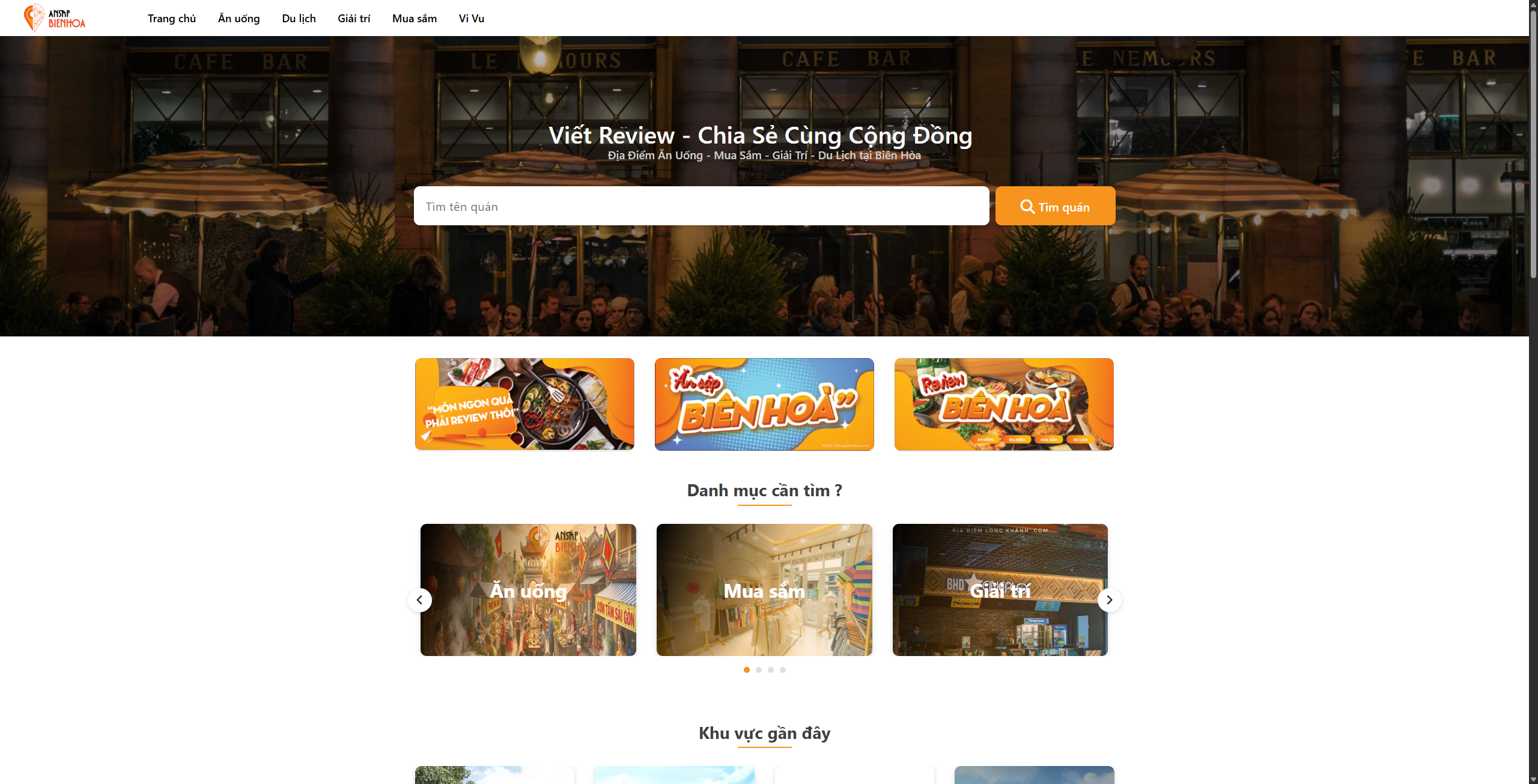
An Sap Bien Hoa is a WordPress-based local discovery platform designed to help users explore places to eat, travel, shop and spend their leisure time across Bien Hoa and surrounding areas in Dong Nai.
Unlike a conventional company website, the platform manages a growing database of locations. Each place can contain structured information such as its address, operating hours, price range, category, area, image gallery and descriptive content.
My role focused on developing the WordPress content structure and responsive frontend required to present this information consistently. ACF and Custom Post Types were used to turn location data into manageable WordPress content rather than relying on individually hard-coded pages.
The result is a reusable directory system where new places can be added and classified through WordPress while automatically appearing in relevant category pages, location archives and other discovery experiences across the website.
The problem
The main challenge was that the website needed to manage many individual places rather than a small number of static pages. Each location could have different information — including address, category, area, price range, opening hours, images and descriptive content — while still needing to follow a consistent presentation.
Managing every place as a manually designed page would make the website difficult to maintain as the database grew. It would also make filtering and grouping locations by category or geographical area unnecessarily complex.
The platform therefore needed a structured WordPress content model where administrators could create a new place once, assign the relevant classifications and have that content automatically appear across different archive and discovery pages.
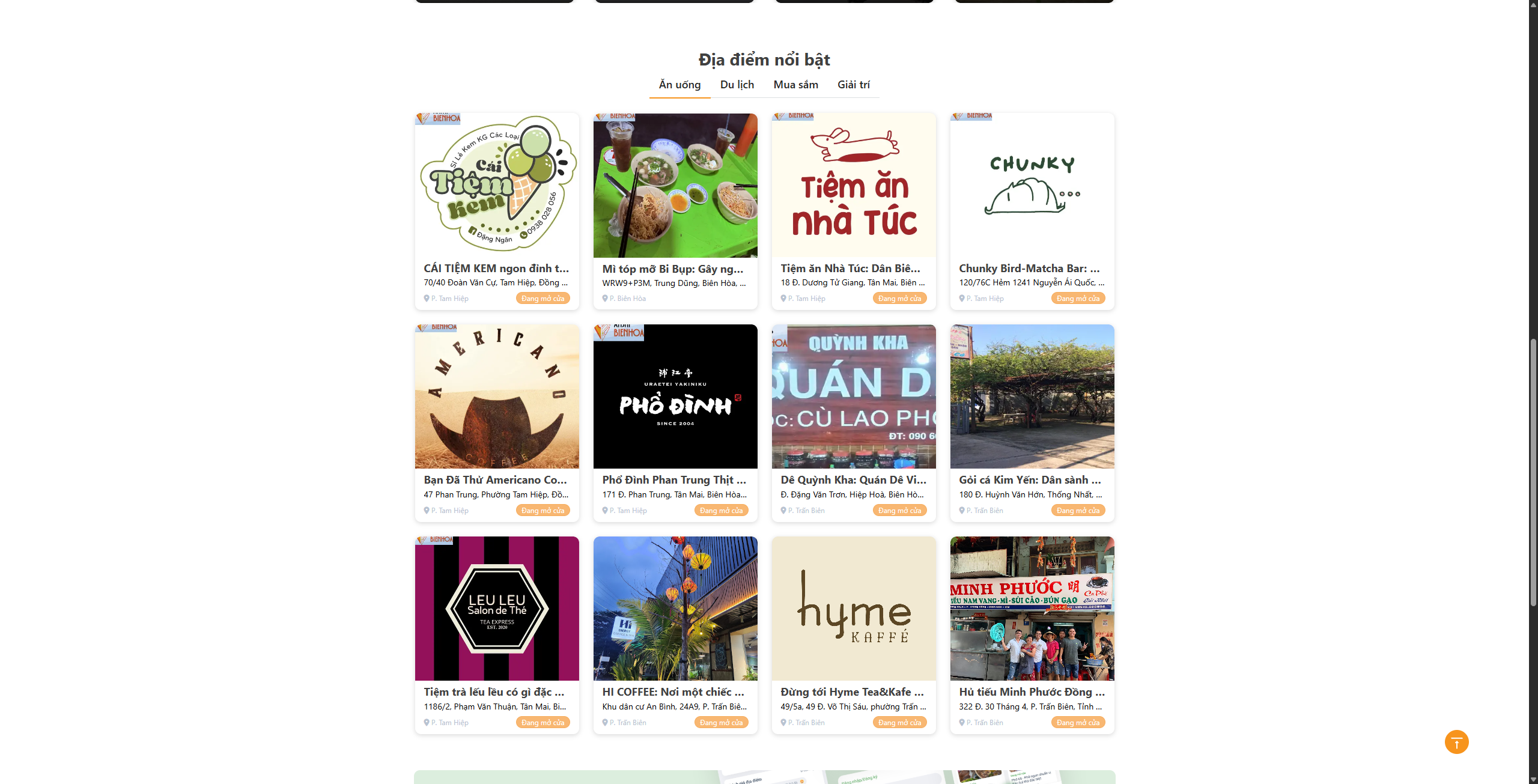
From a frontend perspective, the website also needed to present large amounts of local information without overwhelming users. Listing cards had to remain easy to scan while still exposing useful details such as addresses, prices and opening status.
The solution
I structured the website around reusable WordPress content rather than individual static pages.
Custom Post Types were used to manage places as independent content entities, while ACF provided structured fields for location-specific information. This allowed administrators to manage data through purpose-built fields instead of editing complex HTML inside the WordPress editor.
Classification systems were used to connect places with their relevant categories and geographical areas. This made it possible for a single location to automatically appear in category archives, area-based pages and other listing sections without duplicating its content.
I also developed and customized reusable frontend templates for location listings and detail pages. The same underlying data could therefore be presented consistently across different parts of the website while remaining responsive on desktop, tablet and mobile.
This approach created a content system that could continue growing as more places were added without requiring a new page layout to be developed for every location.
Ownership, made explicit
My contribution
My work focused on WordPress implementation, structured content management and responsive frontend development for a location-based directory platform.
- Developed and customized WordPress templates based on project requirements.
- Built the location content structure using Custom Post Types.
- Created structured ACF fields for information associated with individual places.
- Organized places by content categories and geographical areas.
- Developed reusable listing components for displaying location information consistently.
- Built and customized archive templates for browsing places by category and location.
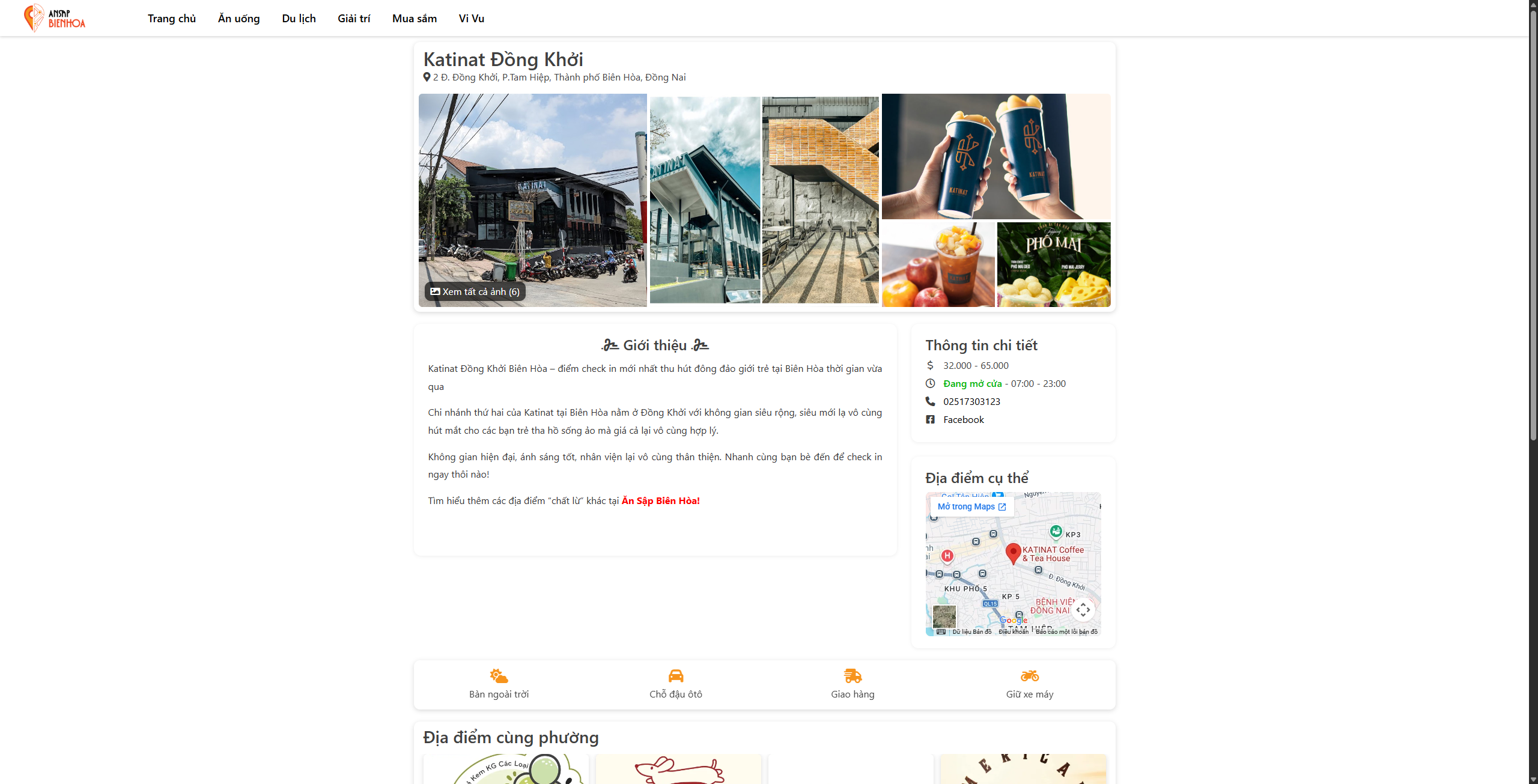
- Developed individual location detail templates using structured WordPress data.
- Implemented responsive frontend layouts using HTML, CSS and JavaScript.
- Handled image presentation and galleries for location-based content.
- Adjusted layouts for desktop, tablet and mobile devices.
- Worked with dynamic WordPress queries to display relevant and related places.
- Improved the editing experience by moving repeated information into dedicated admin fields.
- Supported website testing, troubleshooting and ongoing frontend improvements.
Key features
Structured Place Management
Places are managed as structured WordPress content instead of manually designed pages. Each entry can store reusable information through ACF, making large amounts of location data easier to maintain.
Category-based Discovery
Users can browse places by practical categories such as food, travel, entertainment and shopping. Structured classifications allow new locations to automatically appear within the appropriate archive.
Location-based Browsing
Places can also be explored geographically, allowing users to browse locations within specific areas instead of relying only on content categories.
Rich Place Detail Pages
Each place has its own detail page where structured information, descriptive content, images and related destinations can be presented through a consistent reusable template.
Location Image Galleries
Multiple images can be associated with a location so users can preview the venue and its experience before visiting.
Useful Listing Metadata
Listing cards surface practical information such as addresses, price ranges and operating hours so users can evaluate locations quickly without opening every detail page.
Related Location Discovery
Location pages can surface other places from relevant areas, helping users continue browsing instead of reaching a dead end after viewing a single destination.
Community Contribution
The platform encourages users to contribute places that may not yet be listed, supporting continued growth of the local discovery database.
Responsive Directory Experience
Listing grids, detail content, images and navigation were designed to remain usable across desktop, tablet and mobile devices, which is especially important for a location-discovery website frequently accessed while users are on the move.
Challenges & trade-offs
Managing a growing content database
A directory platform behaves differently from a conventional company website. As new places are added, duplicated page structures quickly become difficult to maintain. The content model therefore needed to separate location data from presentation so that new entries could reuse the same templates automatically.
Designing reusable content fields
Location information contains a mixture of required and optional values. The challenge was creating an editing structure flexible enough to support different types of businesses and destinations while still keeping the backend understandable for content editors.
Supporting multiple discovery paths
A single place may need to appear in category-based pages, geographical archives, featured sections and related-location areas. The structure therefore needed to avoid duplicating the same content while allowing WordPress queries to surface it in different contexts.
Keeping listing cards easy to scan
Directory cards can quickly become cluttered because users want useful information such as category, price, address and operating status. The interface needed to expose useful metadata while preserving a clear visual hierarchy.
Handling different image formats
User-facing location content can contain images with different dimensions and compositions. Templates had to provide predictable presentation without making content editors manually prepare every image for every display context.
Responsive directory layouts
Desktop layouts can display multiple locations and more metadata at once, while mobile screens require tighter prioritization. Listing grids and detail templates therefore needed layouts specifically adapted for smaller devices rather than simply shrinking the desktop interface.
Maintaining consistency as content grows
As more destinations and categories are introduced, visual and structural consistency becomes increasingly important. Reusable templates and structured fields helped prevent individual entries from gradually developing different layouts.
Results & impact
The project created a structured WordPress foundation capable of supporting a large and continuously expanding collection of local destinations.
- Converted individual location content into a reusable WordPress data structure.
- Made it possible to manage place information through structured admin fields instead of rebuilding layouts manually.
- Created reusable archive and detail templates that keep presentation consistent as new locations are added.
- Enabled the same location data to appear across category, area and related-content views without manually duplicating entries.
- Improved content scalability by separating location data from frontend presentation.
- Created a clearer browsing experience for users looking for places by activity or geographical area.
- Established a maintainable content foundation that can accommodate additional locations and categories over time.
Screenshots
Technology stack
Build flexible WordPress content with custom fields, repeaters, relationships, and structured admin fields.
DocumentationCreate responsive layouts, animations, and custom UI components for WordPress websites.
DocumentationCreate structured WordPress content types for projects, locations, courses, and other reusable data.
DocumentationBuild semantic, responsive, and maintainable markup for WordPress themes and templates.
DocumentationImplement frontend interactions such as menus, sliders, filters, galleries, popups, forms, and UI effects.
DocumentationDevelop WordPress themes, templates, hooks, queries, and custom backend functionality.
DocumentationOrganize and classify structured WordPress content using custom categories, terms, and reusable content relationships.
DocumentationBuild and customize websites with custom themes, ACF, Custom Post Types, Taxonomies, plugins, and WordPress APIs.
Documentation